
Best Practices for formatting your WordPress Pages & Posts
WordPress makes it super fun and easy to add great and engaging content to your website as pages and posts. This added content can add real value to your website and create a captive audience if you are using all the right tools to make your content easy to read and legible.
“The right tools?” I hear you ask, well WordPress comes with a wide range of tools within the editor that help to format your text and make it as user friendly as possible. This article will help you get the most out of your WordPress editing bar and help you create articles that are easy to read, great to look at and engaging to any website surfer.
We have six quick tips that will help you format your content quickly and easily every time.
1 ) Use Sub-Headings as Sign Boards
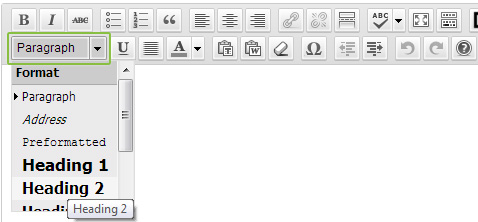
WordPress comes with a number of pre-formatted headings that will help you divide your text into sections for easy reference. Most visitors to your website will skim the sub-headings first to get a feel for your content before exploring it further.
Make your sub-heaings count, use snappy words that spark interest and pay attention to capitalisation. Make a considered decision whether you will only capitalise the First letter of the sub-heading or whether you will use Title Caps and capitalise all the major words.
When choosing which format you would like for your heading, (i.e. which heading tag “h1”, “h2” etc) it is best to stick to a hierarchy.
Heading 1 (h1) tags are usually used in the template design for the page title so rather steer clear of these.
Start with Heading 2 for your first level of sub-headings and then move down to Heading 3 etc as the level diminishes. Each heading tag may be formatted differently depending on your theme set up so do some experimenting first.
2 ) Use Smaller Paragraphs for Bite-sized Chunks
Nobody enjoys ploughing through lines and lines of unbroken text. It is bad enough in print, but it is completely abhorrent on the screen. Adopt a less is more approach. Break large sections up into smaller paragraphs of three to four sentences each for ease of flow.
Stick to one topic per paragraph and try to be concise and to the point.
3 ) Make use of Bullet Points

Bullet points are any blogger or content writers’ friend. They can help break up complicated concepts and descriptions into easy to read points that are eye-catching and simpler to digest.
If you find a paragraph growing uncontrollably, add in the bullet points and simplify the text. There are a number of reasons why bullets are king and here are some (hee hee):
- They are easy to read
- They interrupt the flow and draw attention
- Smaller sentences are easier to digest and remember
- They make you look cool
As with everything, however, moderation is key so don’t create a whole page made of of bullet points, you won’t make any friends there.
4 ) Be BOLD and EMPHASIZE

A page of regular text can be brought to life using bold and italics, but they should never be over done.
Are there any rules for using these tools? In print there certainly are, but the web is a lot more flexible. Here are a couple of guidelines
Bold
Use bold to highlight a concept or draw attention to point you are trying to make. Bolding the first line in a paragraph is a very effective way to draw attention to the point of the paragraph and helps the eye break the page up into readable sections. Just don’t be bolding everything – it can get annoying.
Italic
Italics can be used to infer different meanings to phrases or to stress a point that you, the author would like to make. It can add your voice to the piece without overt explanation.
Underline
Underlining text is very useful in print. It is NOT useful on the web. The web standard is to underline links, so web users have now begun to associate underlined text with a link and will see it as such.
5) Highlight Key Points

Pulling key text into a block quote not only helps to break up the text and add a design element to the page. It highlights a key point that will draw your reader’s eye.
You can use them to highlight a fact, a quote or key concept
Try not to use more than two per page though as they can become distracting and lose their effect.
6) Guide Your Reader and End Well
 Formatting your text is only one link in the creating good content chain. Your content needs to be engaging and leave your reader wanting more. Your first and last paragraphs are inevitably your most important. Your first paragraph needs to pique interest and your last needs to leave a good impression and guide the reader to action.
These actions can include:
- An explicit instruction on what to do next (e.g. go here, join there etc)
- Ask a question and invite readers to comment
- Invite readers to buy something or contact you
- Suggest a new way of looking at a topic
- Encourage the reader to visit another page on your website
Making your articles readable and easy to remember is half the battle won
Do you have any formatting tips you would like to share or any formatting hates? We would love to hear them :0)


